
Google Meet Note Taker Tools: 10 Options


TL;DR
Compare Google Meet note taker tools, including Gemini, browser extensions, privacy options, live transcripts, summaries, and CRM workflows.
A Google Meet note taker can capture the call while you stay with the buyer. The hard part is choosing between native Gemini notes, browser extensions, local transcription, and sales tools that also handle CRM work. Here are 10 options, with the right fit and the trade-off for each.
1. VibeSell
VibeSell is a real-time AI sales companion for B2B teams that need more than a transcript. It prepares a meeting brief before the call, gives live guidance during the discussion, then drafts the summary, follow-up email, and CRM updates before the call ends.

It fits CROs, sales leaders, and account executives who want meeting notes tied to deal work. VibeSell works through a Chrome extension for Google Meet, Microsoft Teams, and Cisco Webex. A native Google Meet add-on is also available. The rep stays in control because CRM changes are suggested first and need approval.
The useful difference is timing. A transcript tells you what happened. VibeSell can surface objection help, competitor context, discovery prompts, and next actions while the buyer is still on the call. Its guidance is sparse by design, so the rep does not need to stare at another screen.
VibeSell also reviews how its guidance worked and suggests improvements based on team feedback. Leaders can approve or reject those changes. That gives the assistant a path toward the company’s sales method instead of leaving every rep with generic prompts.
The trade-off is fit. VibeSell is built for sales teams, not someone who only wants meeting minutes. It also needs a scheduled meeting for its full pre-call context. The newer desktop client is still a new part of the product, not a promise that every meeting platform works today.
2. Google Meet: Native Gemini note-taking
Google Meet’s native Gemini note-taking is the simplest Google Meet note taker for eligible Google Workspace users. Join the meeting, open the meeting controls, and choose the option to take notes with Gemini. In some Meet layouts, the control appears in the top-right area.

Gemini turns the discussion into a notes document. After the call, the document is saved to the organizer’s Google Drive. It can also be attached to the Google Calendar event, while the organizer and the person who started note-taking receive a link.
That setup works well when your company already runs on Google Workspace. There is no separate extension to install, and the notes stay close to Drive and Calendar. The catch is access. Personal Gmail accounts may not have the feature, and the meeting owner or Workspace administrator may control whether it is allowed.
Native notes also have a narrower job than a sales companion. Gemini can capture discussion and produce notes, but it does not provide the full mix of live sales guidance and built-in CRM workflows found in VibeSell. Live transcription may also be available without showing every spoken word on screen.
Before rollout, admins should check who can start notes, who can view the document, and how attendees are notified. Your privacy policy should cover recorded or transcribed calls before the feature reaches customer meetings.
3. Tactic AI Noteaker: Real-time conversation capture
Tactic AI Noteaker is a Chrome extension for people who want a live transcript while a Google Meet call is in progress. It is aimed at users who need to see the spoken words, mark key moments, and turn the transcript into notes later.

The extension can capture conversations in real time and generate AI summaries.
Tactic is a sensible fit for personal Gmail users who cannot use native Gemini.
The limit is sales continuity. A transcript and summary still leave someone to check the CRM, decide what belongs in the record, and write the follow-up. You should also review the extension’s access and retention terms before using it on sensitive calls.
For a browser-first note workflow, Tactic keeps the setup light. For a team that needs pre-call research and approved CRM updates, look beyond transcription.
4. Tactic: Lightweight Google Meet capture
Tactic gives Google Meet users a lightweight way to capture a call without adding a visible bot. The extension can open a live transcript, highlight key points, and produce AI summaries while the meeting runs.

This is useful when a personal Gmail account lacks native Gemini access. It also helps when attendees dislike a separate bot joining the call. A rep can keep the meeting window open while the extension records the spoken flow in the browser.
The notes can move outside Google tools. Research tied to this option names Google Docs, Notion, Slack, and similar destinations. That matters when your team tracks tasks in a work app rather than in Calendar.
Still, exports are not the same as an approved CRM workflow. Someone must check the summary, remove mistakes, and decide which fields need an update. Ask for consent before recording, even when no bot appears in the participant list.
Pick Tactic when speed and low setup matter most. Pick a sales-focused system when every call needs context before it starts and a clear handoff after it ends.
5. Otter: Live transcription and meeting assistance
Otter is a flexible Google Meet note taker with live transcription, summaries, speaker recognition, and searchable meeting history. It can capture meetings through a meeting agent or from a desktop device without a bot joining the call.

Its free tier makes it easy to test the basic workflow. Otter can turn a conversation into a summary with decisions and action items. Its AI chat can also search across past meeting content, which helps when a manager needs to find an old commitment without replaying the call.
Otter has a wider set of use cases than sales calls. Teams may use it for interviews, lectures, internal meetings, or customer discussions. Otter offers integrations and CRM workflows for sales users, including Salesforce and HubSpot connections.
That breadth can be useful, but it can also mean more setup work. Decide whether your team needs a shared meeting library, a bot-based agent, desktop capture, or a direct sales workflow. Those choices affect consent, admin review, and how notes reach the CRM.
Otter is a good match when searchable transcripts are the main need. If live guidance must shape the call itself, test that experience with your sales team before rollout.
6. Fathom: Free meeting summaries for sales teams
Fathom focuses on meeting summaries and follow-up work. It has a free tier, supports bot and bot-free capture, and makes summaries available after the call.

Fathom fits teams that want every customer conversation turned into a clear record. It offers CRM connections with Salesforce and HubSpot.
That CRM angle makes Fathom more useful to sales teams than a plain transcript extension. A manager can search past conversations, check what was promised, and review signals across calls. The free entry point also gives a small team room to test the process before committing budget.
The key limitation is timing. Fathom is mainly about what happens after the meeting. It does not replace a pre-call brief or a live prompt that helps a rep handle an objection in the moment. Confirm which CRM actions are included in your plan and whether they need review before they change a record.
For teams focused on post-call summaries, Fathom keeps the workflow clear. Sales leaders who want in-call support should compare it with VibeSell’s live guidance model.
7. Fireflies: Structured summaries and CRM integrations
Fireflies is built for teams that want structured meeting summaries with action items and CRM connections. It includes real-time transcription plus integrations with Salesforce, HubSpot, and Pipedrive.
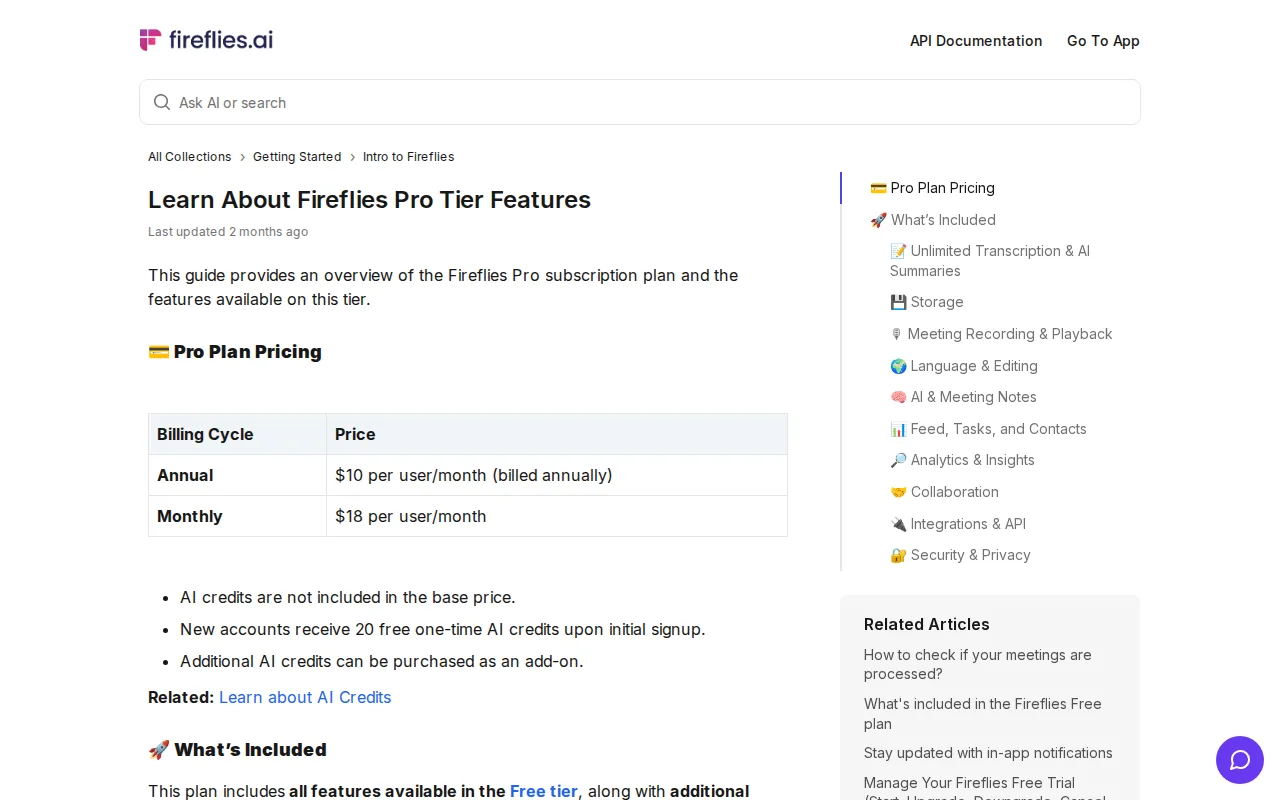
Its stated starting price is $10 per user per month on an annual plan. That gives sales leaders a lower-cost path into shared meeting records, especially when the main goal is to reduce manual note work after calls.
Fireflies can help a manager spot what was said across many meetings. A structured summary is easier to review than a long transcript, and CRM connections can reduce the copy-and-paste work between the meeting record and the deal record.
The trade-off is the depth of live help. The research supports transcription, summaries, action items, and integrations, but it does not establish the same sales guidance depth as VibeSell. Check how your team approves CRM changes before you connect a large number of meetings.
Fireflies makes sense when shared records and CRM reach matter more than pre-call preparation. Its lower listed entry price may also suit teams running an early workflow test.
8. Fellow AI: Notes and action items for recurring meetings
Fellow AI is a meeting assistant for teams that need notes, action items, and continuity across recurring meetings. It includes action items and real-time transcription.

This is a strong fit for weekly account reviews, one-to-ones, and cross-functional meetings where the same commitments return each week. A shared agenda gives people a place to add topics before the call. Afterward, the record can keep decisions and assigned tasks visible.
Fellow AI also connects with Google Meet, Zoom, and Microsoft Teams. Fellow AI includes Salesforce and HubSpot integrations, which may help sales teams keep meeting context near account data.
Privacy still needs a clear rule. Set that rule before deployment, then tell attendees when capture is active. Also confirm who can search the shared meeting history.
Choose Fellow AI when meeting discipline is the main problem. Choose a sales companion when reps need buyer research and live help before the follow-up stage.
9. Privacy-first local transcription tools
Privacy-first local transcription tools keep capture closer to the user’s device instead of relying on a meeting bot. Quill is the named example in the research, with a desktop app that can capture audio on top of a Google Meet call.

This approach can reduce the social friction of a bot appearing in the participant list. It may also appeal to teams that handle sensitive product, legal, or customer data. Quill’s workflow includes transcription, summaries, follow-up questions, audio playback, and transcript imports.
Local capture does not remove the need for consent. Tell the other person when the conversation is recorded or transcribed. Your company should also check where files are stored, who can export them, and whether the device meets internal security rules.
The main trade-off is workflow depth. A local tool can capture the call well, but it may not know the attendee list, account history, deal stage, or sales method. You may still need to move approved notes into the CRM by hand.
Use this category when data control comes first. It is less suitable when your team needs one connected process before, during, and after every sales call.
10. Google Meet Chrome extensions: Flexible add-on workflows
Chrome extensions are the broadest category of Google Meet note taker. They can add live transcripts, summaries, screenshots, highlights, exports, and custom prompts without changing the meeting platform.

The right extension depends on the handoff you need after the call. Use this decision view before installing one:
| Need | Look for | Trade-off |
|---|---|---|
| Live words on screen | Real-time transcript | Accuracy can vary with sound quality and speakers. |
| Short meeting record | AI summary with decisions | A summary may miss detail or assign the wrong owner. |
| Work outside Google | Exports to Docs, Notion, Slack, or PDF | Exports may need manual cleanup. |
| Sales operations | CRM integration with approval controls | Native CRM workflows may cost more than a basic extension. |
| Sensitive calls | Clear retention and sharing settings | Local capture can limit team search and shared access. |
Extensions are easy to test, but easy to over-install. Pick one owner for the rollout. Set a consent message, define where transcripts live, and test one internal meeting before using the tool with customers.
For sales leaders, the decision is simple: a browser add-on handles capture, while a sales companion handles context, guidance, and approved CRM work. Our wider comparison of AI sales assistant software covers that difference in more detail.
Key Takeaway: Choose the lightest tool that solves your real handoff problem. A transcript is enough for personal notes. A sales team needs a controlled path from meeting prep to approved CRM updates.
FAQ
Conclusion
For personal notes, start with Gemini or a browser extension. For a B2B sales team that needs meeting briefs, live guidance, and approval-based CRM work, start a VibeSell trial at VibeSell. This week, test one recurring customer meeting and compare the time spent before the call, during the call, and on follow-up.


